Disk usage analyzer for macOSAnalizator zajętości dysku dla macOS

See what fills your Mac's disk.Zobacz, co zajmuje miejsce na Twoim Macu.

Storagelyzer draws your disk as rings you can explore, grows the picture live while it scans, and helps you free up space without risky deletes.

Storagelyzer rysuje dysk jako pierścienie, po których można się poruszać, rozbudowuje obraz na żywo w trakcie skanowania i pomaga zwolnić miejsce bez ryzykownego kasowania.

PlatformSystem
macOS 11+
Built withTechnologie
Rust · Tauri 2 · React · TypeScript
App sizeRozmiar
≈ 5 MB
LanguagesJęzyki
English, Polishpolski, angielski
LicenseLicencja
MIT

Live demo on generated data. Hover the rings, click a folder to zoom in, click the centre to go back.Demo na żywo na wygenerowanych danych. Najedź na pierścienie, kliknij folder, żeby go przybliżyć, kliknij środek, żeby wrócić.

A real scan of /System/Library from the author's Mac, kept to its 19,924 biggest items.Prawdziwy skan /System/Library z Maca autora, ograniczony do 19 924 największych elementów.

Open in a new tab ↗Otwórz w nowej karcie ↗

FeaturesFunkcje

What you can do with itCo można z nim zrobić

The recordings use generated demo data. Everything else is the real interface.Nagrania korzystają z wygenerowanych danych demo. Cała reszta to prawdziwy interfejs.

Watch the scan happenSkan na żywo

Pick a disk or a folder and the rings sweep in straight away. As the scanner finds more, the chart grows smoothly: segments slide into place instead of jumping between updates, and folders that are still being read pulse softly.

Wybierz dysk albo folder, a pierścienie pojawią się od razu. W miarę jak skaner znajduje kolejne pliki, wykres płynnie rośnie: segmenty przesuwają się na swoje miejsce zamiast przeskakiwać, a foldery, które są jeszcze czytane, delikatnie pulsują.

  • A whole Mac in secondsCały Mac w kilka sekund
  • Sizes match duRozmiary zgodne z du
  • iCloud files stay in the cloudPliki z iCloud zostają w chmurze
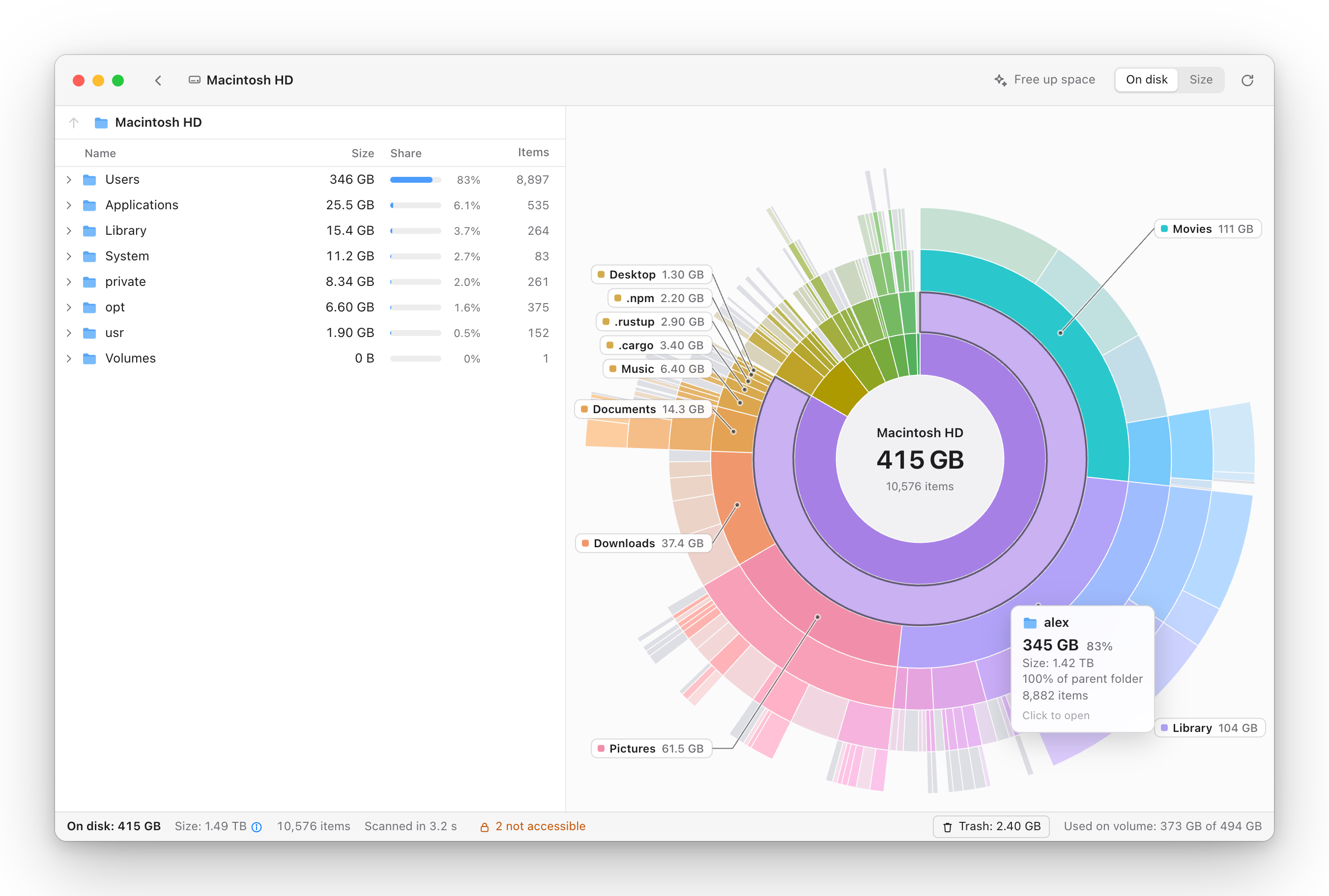
Point at a folder to see inside itNajedź na folder, żeby zajrzeć do środka

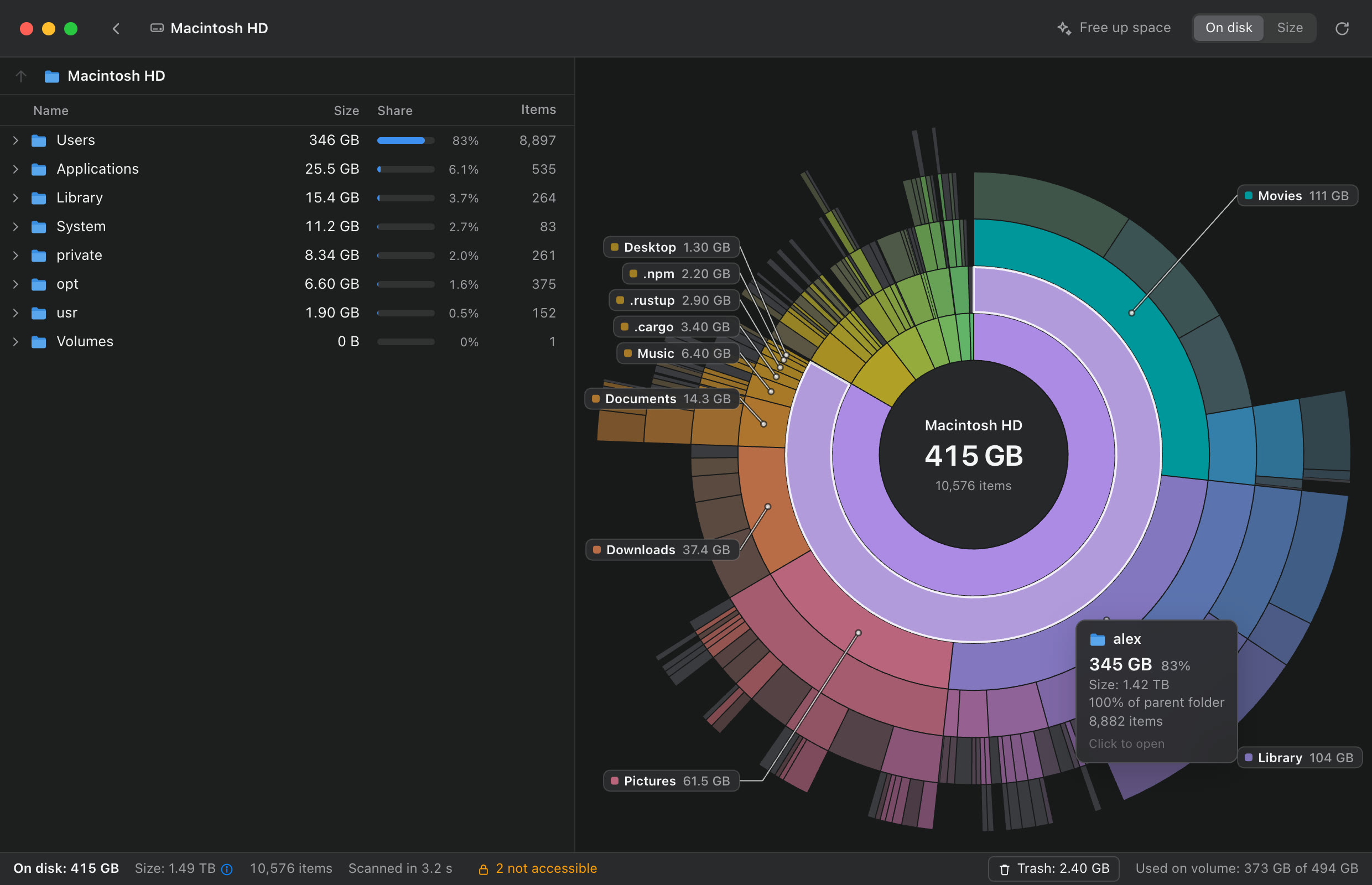
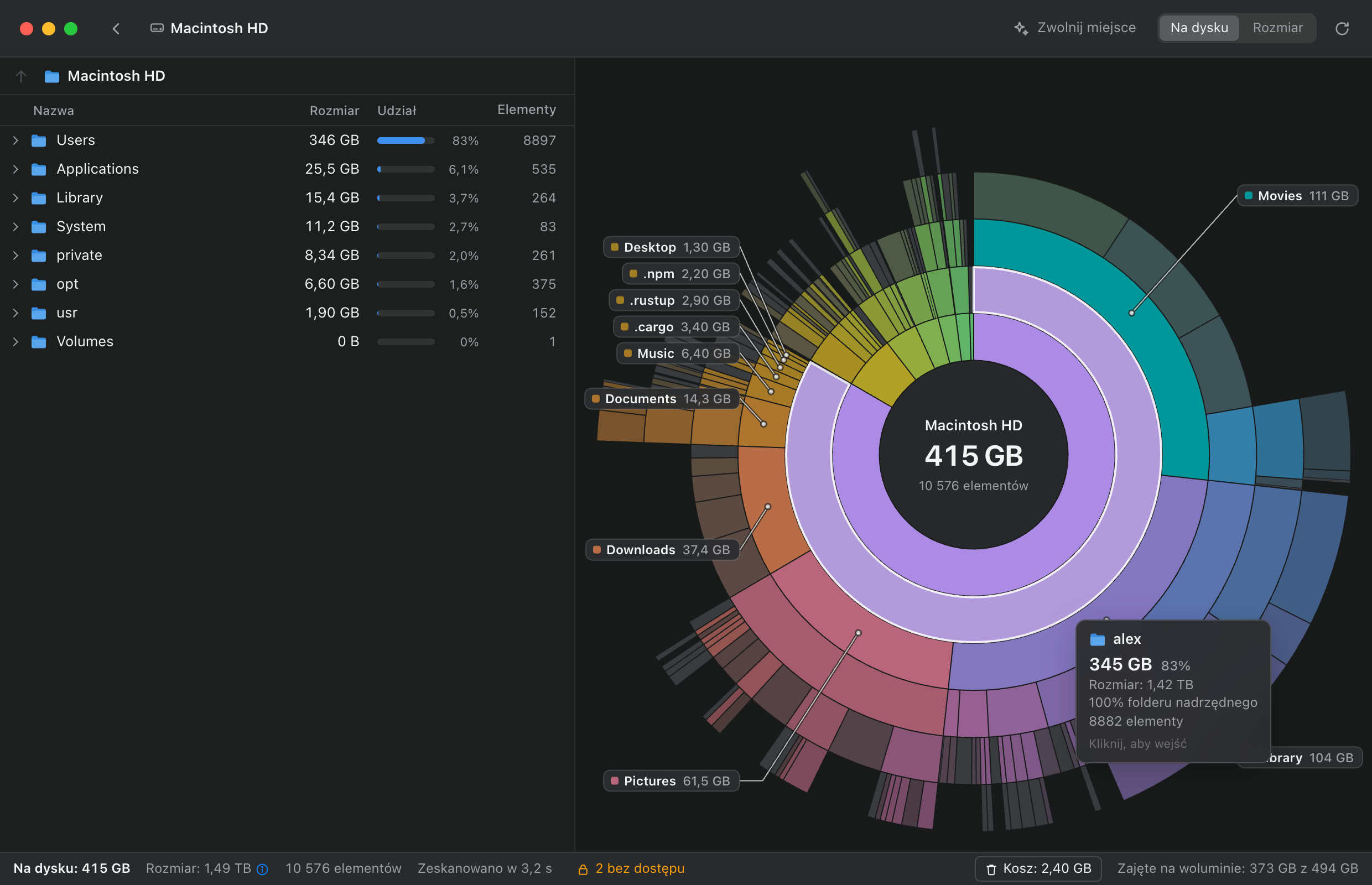
Hover a ring and lines lead to the biggest items inside it, each labelled with its name and size. The labels line up on both sides of the chart without overlapping. Click to zoom in, click the centre to go back up.

Najedź na pierścień, a linie wskażą największe elementy w środku, każdy z nazwą i rozmiarem. Etykiety ustawiają się po obu stronach koła i nie nachodzą na siebie. Kliknij, żeby przybliżyć, kliknij środek, żeby wrócić wyżej.

  • Up to 10 labelsDo 10 etykiet
  • Lines never crossLinie się nie krzyżują
  • Animated zoomAnimowane przybliżanie

A list that follows the chartLista, która idzie za wykresem

Beside the chart sits a folder tree sorted by size, with share, item count and last change. Hover a row and its segment lights up; Enter opens it in the chart and ⌘↑ goes back. It stays smooth with hundreds of thousands of rows.

Obok wykresu jest drzewo folderów posortowane od największych, z udziałem, liczbą elementów i datą zmiany. Najedź na wiersz, a jego segment się podświetli; Enter otwiera go na wykresie, a ⌘↑ wraca wyżej. Działa płynnie nawet przy setkach tysięcy wierszy.

  • Space for Quick LookSpacja: Quick Look
  • ⌘⌫ moves to Trash⌘⌫ przenosi do Kosza
  • Show in FinderPokaż w Finderze

Sizes you can trustRozmiary, którym można ufać

“On disk” counts the blocks a file really takes, like du. “Size” is the length Finder shows. When the two differ wildly, say a 1 TB Docker disk image that takes 20 GB, the app lists the files behind the gap: sparse files, files kept only in iCloud and compressed files.

„Na dysku” liczy bloki, które plik naprawdę zajmuje, jak du. „Rozmiar” to długość, którą pokazuje Finder. Gdy te liczby bardzo się różnią, np. obraz dysku Dockera ma 1 TB, a zajmuje 20 GB, aplikacja wymienia pliki, które za tym stoją: rzadkie, trzymane tylko w iCloud i skompresowane.

  • Hard links count onceTwarde dowiązania liczone raz
  • Switching morphs the chartPrzełączenie przekształca wykres

Free up space, safelyBezpieczne zwalnianie miejsca

The clean-up assistant measures what hides behind macOS “System Data”: app caches, logs, Xcode and simulator data, developer tool caches, old iPhone backups, installers and Time Machine snapshots. It also ranks your apps by size with when you last opened them, and finds data left behind by apps you have uninstalled.

Asystent sprzątania mierzy, co kryje się za „Danymi systemowymi” w macOS: pamięć podręczną aplikacji, logi, dane Xcode i symulatorów, cache narzędzi deweloperskich, stare kopie iPhone'a, instalatory i lokalne migawki Time Machine. Pokazuje też aplikacje według rozmiaru z datą ostatniego otwarcia i znajduje dane, które zostały po odinstalowanych programach.

  • Everything goes to the Trash firstWszystko najpierw trafia do Kosza
  • No hard-coded app listBez listy aplikacji na sztywno

ComparisonPorównanie

One folder, two waysJeden folder, dwa sposoby

macOS's own Storage settings sum the disk up in categories, and whatever the system can't place lands in System Data, which you can't manage directly. To find out which folders take the space, the usual tool is du in the Terminal. Here is the same folder both ways, on the author's Mac.

Ustawienia „Pamięć masowa” w macOS podsumowują dysk w kategoriach, a to, czego system nie przypisze, trafia do „Danych systemowych”, którymi nie da się zarządzać bezpośrednio. Żeby sprawdzić, które foldery zajmują miejsce, zwykle sięga się po du w Terminalu. Oto ten sam folder na dwa sposoby, na Macu autora.

Terminal

du: a list, one level at a timedu: lista, poziom po poziomie

zsh
$ time du -sh /System/Library/* \
    | sort -hr | head -12
 17G	/System/Library/AssetsV2
4.3G	/System/Library/PrivateFrameworks
954M	/System/Library/CoreServices
920M	/System/Library/Frameworks
812M	/System/Library/LinguisticData
811M	/System/Library/Templates
564M	/System/Library/Fonts
521M	/System/Library/Desktop Pictures
336M	/System/Library/Extensions
282M	/System/Library/ExtensionKit
260M	/System/Library/Assistant
179M	/System/Library/Components
real 5.66s
  • One level only. To see inside AssetsV2, you run it again on that folder.Tylko jeden poziom. Żeby zajrzeć do AssetsV2, trzeba uruchomić polecenie jeszcze raz na tym folderze.
  • Nothing shows up until every file has been read.Nic się nie pojawia, dopóki nie zostaną przeczytane wszystkie pliki.
  • Sizes only: no item counts, no logical size, nothing to click.Same rozmiary: bez liczby elementów, rozmiaru logicznego i niczego do kliknięcia.
Storagelyzer

Storagelyzer: the whole folder as a mapStoragelyzer: cały folder jako mapa

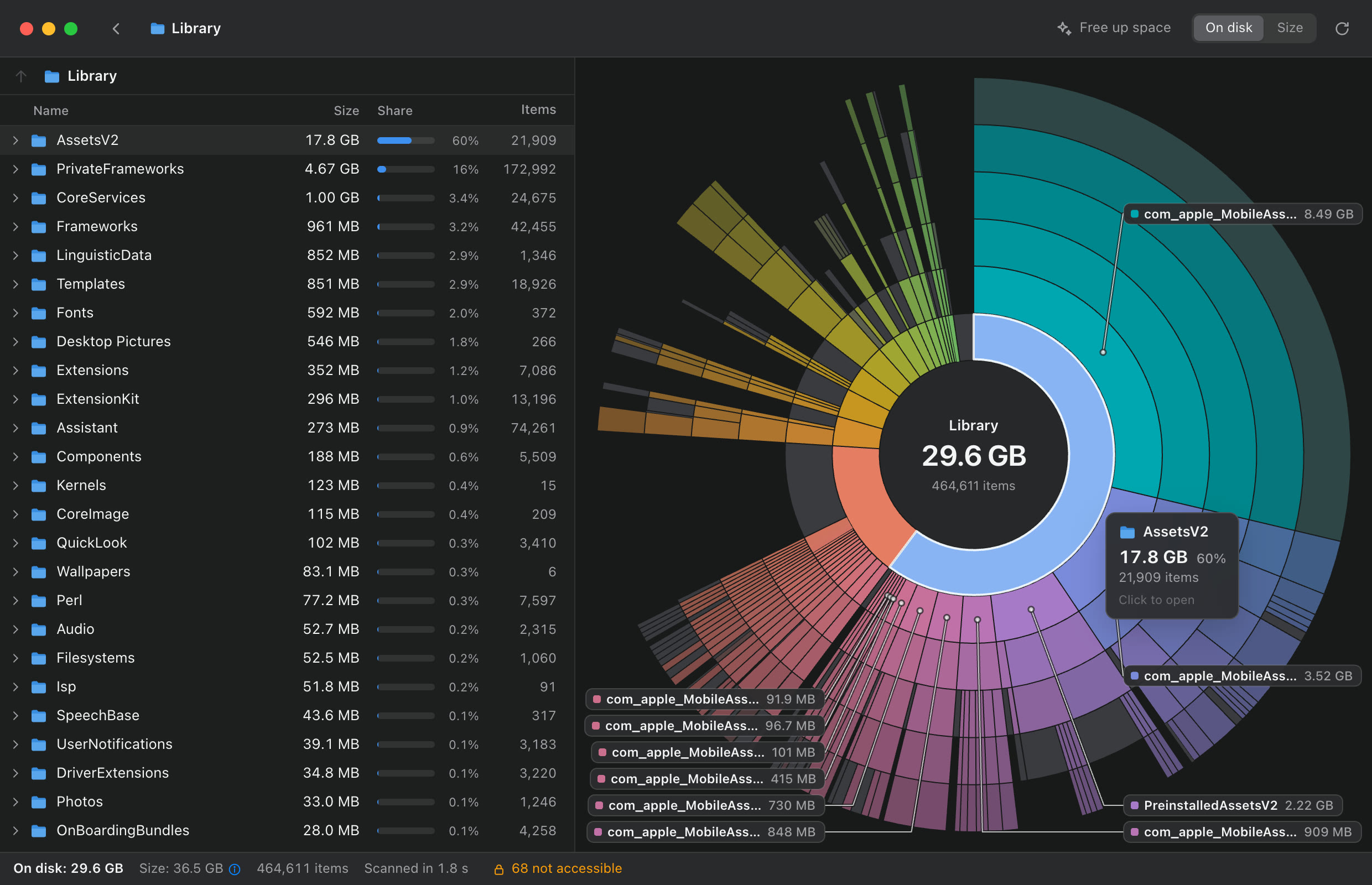
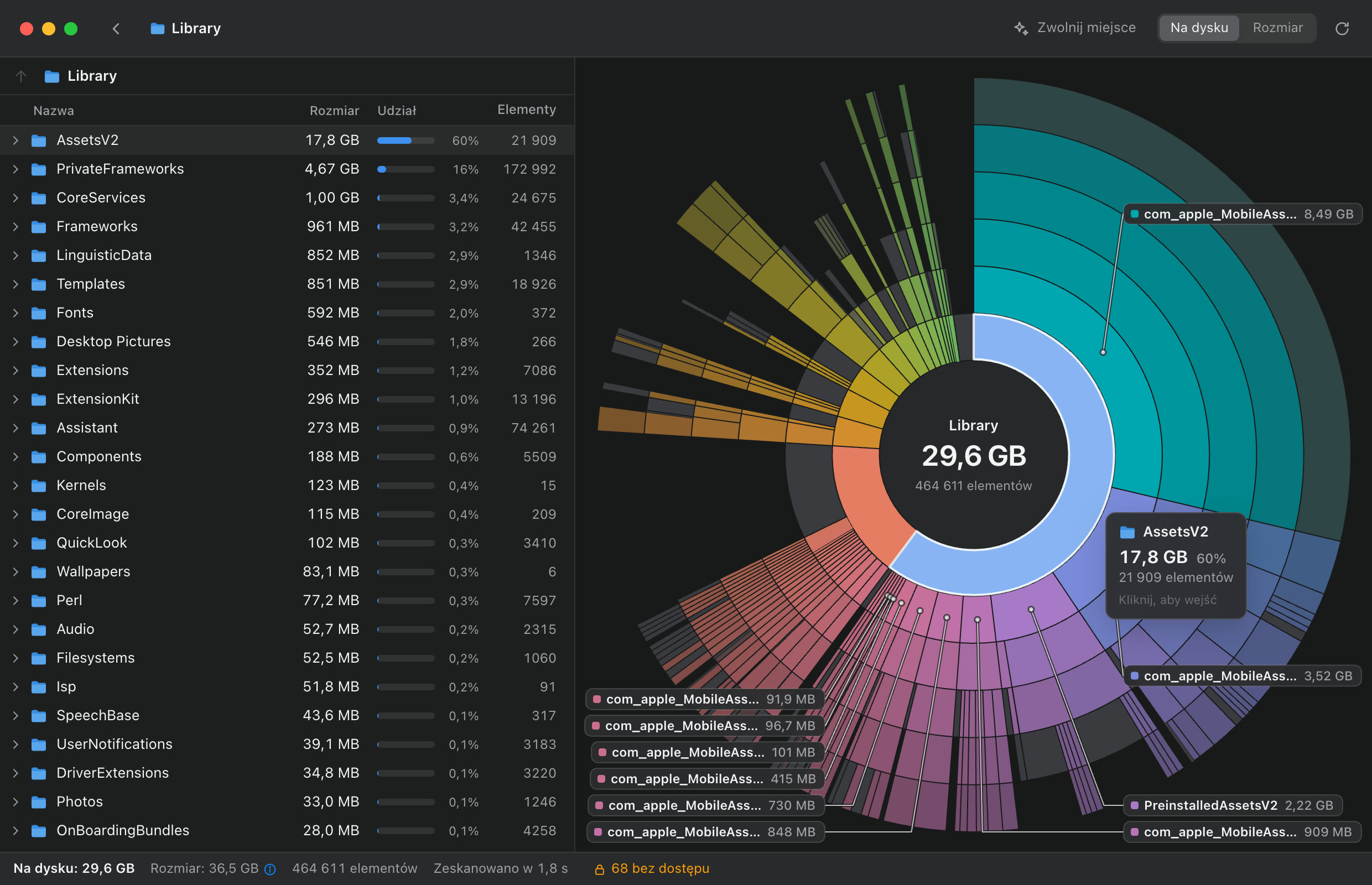
Storagelyzer showing /System/Library: AssetsV2 takes 17.8 GB, 60% of 29.6 GB, and lines point to the biggest items inside it Storagelyzer z /System/Library: AssetsV2 zajmuje 17,8 GB, 60% z 29,6 GB, a linie wskazują największe elementy w środku
  • Six levels at once. Hover a folder to see what's inside it, click to go in.Sześć poziomów naraz. Najedź na folder, żeby zobaczyć, co jest w środku, kliknij, żeby wejść.
  • The chart fills in while the scan runs. This scan took 1.8 s.Wykres wypełnia się w trakcie skanu. Ten skan trwał 1,8 s.
  • Size on disk and logical size, item counts, and a list of the 68 items it could not read.Rozmiar na dysku i logiczny, liczba elementów oraz lista 68 elementów bez dostępu.
Explore this scan in the live demoPrzejrzyj ten skan w demo na żywo

Both sides are real output for /System/Library on the same Mac, one run each; the table below has medians of seven. Both report the same total, 29,574,684,672 bytes. du -h counts in binary units (1G is 1024³ bytes), which is why its 17G for AssetsV2 is the 17.8 GB on the right. For the demo, the scan is kept to its 19,924 biggest items, and everything smaller is drawn in the grey slices.

Obie strony to prawdziwy wynik dla /System/Library na tym samym Macu, po jednym uruchomieniu; tabela niżej podaje mediany z siedmiu. Oba narzędzia podają tę samą sumę: 29 574 684 672 bajtów. du -h liczy w jednostkach binarnych (1G to 1024³ bajtów), dlatego jego 17G dla AssetsV2 to 17,8 GB po prawej. W demo skan jest ograniczony do 19 924 największych elementów, a wszystko mniejsze trafia do szarych wycinków.

Speed, measuredSzybkość, zmierzona

Both tools read the same four folders, seven times each. The table shows the median time of the whole process, from start to exit.

Oba narzędzia czytały te same cztery foldery, każde po siedem razy. Tabela pokazuje medianę czasu całego procesu, od uruchomienia do zakończenia.

Folder ItemsElementy On diskNa dysku du Storagelyzer Time to scaleCzas w skali FasterSzybciej
/System/Library 464,611464 611 29.6 GB29,6 GB 5.83 s5,83 s 2.12 s2,12 s 2.7×2,7×
/Applications 410,348410 348 38.3 GB38,3 GB 3.80 s3,80 s 0.77 s0,77 s 4.9×4,9×
/Library 141,555141 555 6.7 GB6,7 GB 0.78 s0,78 s 0.36 s0,36 s 2.2×2,2×
/usr 34,69934 699 2.0 GB2,0 GB 0.14 s0,14 s 0.05 s0,05 s 2.8×2,8×
  • du
  • Storagelyzer
  • In each row both bars share one scale: the full bar is du's time.W każdym wierszu oba paski mają tę samą skalę: pełny pasek to czas du.

Measured on 4 November 2026 on an Apple M4 Max with 48 GB of RAM, macOS 27.0.1, with a warm cache: each tool ran once before the seven timed runs. du runs as du -sk, and for /Library as du -skx, because an iOS simulator disk image is mounted inside it: a separate 17 GB disk that Storagelyzer doesn't walk into. With that, both report the same total, to the byte, for every folder. A first scan after a restart, with a cold cache, is slower for both and isn't measured here. The script is scripts/compare-du.py, and every run is listed in docs/benchmark.md.

Pomiar z 4 listopada 2026 r. na Apple M4 Max z 48 GB RAM, macOS 27.0.1, przy rozgrzanej pamięci podręcznej: każde narzędzie uruchomiło się raz przed siedmioma mierzonymi przebiegami. du działa jako du -sk, a dla /Library jako du -skx, bo w środku jest podmontowany obraz dysku symulatora iOS: osobny dysk o rozmiarze 17 GB, do którego Storagelyzer nie wchodzi. Wtedy oba narzędzia podają dla każdego folderu tę samą sumę co do bajta. Pierwszy skan po restarcie, bez danych w pamięci podręcznej, jest wolniejszy dla obu i tu nie był mierzony. Skrypt to scripts/compare-du.py, a wszystkie przebiegi są w docs/benchmark.md.

DetailsSzczegóły

Made for macOSZrobiony dla macOS

The whole app is about 5 MB. Tauri uses the WebKit built into macOS instead of bundling a browser; Electron apps typically weigh 150–600 MB.

Cała aplikacja waży około 5 MB. Tauri korzysta z WebKitu wbudowanego w macOS, zamiast dołączać własną przeglądarkę; aplikacje w Electronie ważą zwykle 150–600 MB.

  • Light and dark modeJasny i ciemny motyw

    Follows the system appearance.Zgodnie z ustawieniem systemu.

  • Finder and Quick LookFinder i Quick Look

    Reveal in Finder, preview with Space.Pokaż w Finderze, podgląd Spacją.

  • Keyboard firstObsługa z klawiatury

    Arrow keys, Enter, ⌘↑ and ⌘⌫.Strzałki, Enter, ⌘↑ i ⌘⌫.

  • English and PolishPolski i angielski

    Picks your system language.Według języka systemu.

  • Drag and dropPrzeciągnij i upuść

    Drop a folder on the window to scan it.Upuść folder na okno, żeby go zeskanować.

  • Open about gapsOtwarcie o brakach

    Lists folders it could not read and space the scan cannot see, such as snapshots.Pokazuje foldery bez dostępu i miejsce, którego skan nie widzi, np. migawki.

Storagelyzer in light mode, with the same folder list and sunburst chart

Under the hoodPod maską

A scanner tuned for APFSSkaner dostrojony do APFS

A disk analyzer is only as good as its scanner. Storagelyzer's is written in Rust around how APFS actually behaves, and the interface is React and TypeScript, drawn on a canvas in the system WebView.

Analizator dysku jest tak dobry, jak jego skaner. Ten w Storagelyzerze jest napisany w Ruście pod to, jak naprawdę zachowuje się APFS, a interfejs to React i TypeScript, rysowany na canvasie w systemowym WebView.

  • getattrlistbulk(2)

    Many files per system callWiele plików na jedno wywołanie

    Instead of readdir plus lstat for every file, one call returns names, types, sizes, inodes and mount status for a whole batch of entries.

    Zamiast readdir i lstat dla każdego pliku jedno wywołanie zwraca nazwy, typy, rozmiary, i-węzły i status montowania dla całej paczki wpisów.

  • STORAGELYZER_THREADS=4

    Four threads is the sweet spotCztery wątki to optimum

    APFS does not list directories faster with more threads: sixteen were 2–5× slower than four, even with no locking in the app. Four is the default.

    APFS nie listuje katalogów szybciej przy większej liczbie wątków: szesnaście było 2–5× wolniejsze niż cztery, nawet bez żadnych blokad w aplikacji. Domyślnie są cztery.

  • /usr/share/firmlinks

    Nothing counted twiceNic nie liczy się podwójnie

    Since Catalina, /Users and /Applications are firmlinks into the Data volume. Directories are deduplicated by device and inode, volumes from the same container are scanned in a second pass, and hard links count once.

    Od Cataliny /Users i /Applications to firmlinki do woluminu Data. Katalogi są deduplikowane po urządzeniu i i-węźle, woluminy z tego samego kontenera skanowane w drugim przebiegu, a twarde dowiązania liczone raz.

  • IOPOL_TYPE_VFS_MATERIALIZE_DATALESS_FILES

    Never downloads from iCloudNic nie ściąga z iCloud

    Scanner threads turn off file materialization, so cloud-only files count at their local size and nothing is fetched. Access times stay untouched, and other disks and network shares are skipped.

    Wątki skanera mają wyłączone pobieranie plików, więc pliki tylko w chmurze liczą się z lokalnym rozmiarem i nic nie jest ściągane. Czasy dostępu zostają nietknięte, a inne dyski i udziały sieciowe są pomijane.

  • ≈ 48 B / node

    The file tree stays in RustDrzewo plików zostaje w Ruście

    Nodes live in a compact arena, about 48 bytes each plus the name, so two million files take about 140 MB. The interface gets only what it shows: a pruned subtree for the chart and pages of rows for the list.

    Węzły siedzą w zwartej arenie, ok. 48 bajtów na każdy plus nazwa, więc dwa miliony plików to ok. 140 MB. Interfejs dostaje tylko to, co pokazuje: przycięte poddrzewo do wykresu i strony wierszy dla listy.

  • buildMorph()

    Updates that morphAktualizacje, które się przekształcają

    Every progress update blends into the next: segments matched by id grow and slide, new ones emerge inside their parent, and removed ones shrink and fade. The hover labels glide along.

    Każda aktualizacja postępu płynnie przechodzi w następną: segmenty dopasowane po id rosną i przesuwają się, nowe wyłaniają się w obrębie rodzica, a znikające zwijają się i gasną. Etykiety płyną razem z nimi.

How it fits togetherJak to jest poskładane

WebViewReact 19 · TypeScript · Canvas 2D
  • StartScreenhome folder and disksfolder domowy i dyski
  • ScanViewtoolbar, list and chartpasek, lista i wykres
  • TreeListvirtualized folder treewirtualizowane drzewo folderów
  • RingChartsunburst, morphing, labelssunburst, przejścia, etykiety
RustTauri 2 · rayon · libc
  • commands.rsstart_scan, get_rings, get_children
  • scan/parallel scanner on getattrlistbulkrównoległy skaner na getattrlistbulk
  • tree.rsnode arena, sizes roll up livearena węzłów, rozmiary liczone na bieżąco
  • volumes.rsdisks and APFS containersdyski i kontenery APFS
  • cleanup.rsFree up space rulesreguły „Zwolnij miejsce”
  • apps.rsLaunchServices and SpotlightLaunchServices i Spotlight
  • macos.rsFull Disk Access, Finder, TrashPełny dostęp do dysku, Finder, Kosz

The codebaseKod

Lines of code in the repository, drawn the way macOS draws storage.Linie kodu w repozytorium, narysowane tak, jak macOS rysuje zajęte miejsce.

  • Rust 3,7563756
  • TypeScript 5,4205420
  • CSS 1,8861886
  • Rust 2024
  • Tauri 2
  • React 19
  • TypeScript 6
  • Vite 8
  • rayon
  • Canvas 2D

cargo test covers the tree model, the scanner, volumes and the clean-up rules.

cargo test obejmuje model drzewa, skaner, woluminy i reguły sprzątania.

Every screenshot and recording on this page is made by a script: headless Chrome drives the interface on demo data, and ffmpeg encodes the result.

Każdy zrzut i nagranie na tej stronie robi skrypt: headless Chrome steruje interfejsem na danych demo, a ffmpeg koduje wynik.

BuildInstalacja

Build it yourselfZbuduj u siebie

There is no signed download yet, so the app is built from source. You need macOS 11 or later, Rust, Node.js 20+ and the Xcode Command Line Tools.

Nie ma jeszcze podpisanej wersji do pobrania, więc aplikację buduje się ze źródeł. Potrzebujesz macOS 11 lub nowszego, Rusta, Node.js 20+ i Xcode Command Line Tools.

Terminal
git clone https://github.com/wojtekbakun/storagelyzer.git
cd storagelyzer
npm install
npm run install-app

The last command builds Storagelyzer.app and moves it to /Applications. Then give it Full Disk Access in System Settings → Privacy & Security → Full Disk Access. Without it, macOS hides Mail, Messages, Safari and other apps' data, so totals come out too low; the app tells you when that happens.

Ostatnie polecenie buduje Storagelyzer.app i przenosi go do /Applications. Potem nadaj mu Pełny dostęp do dysku w Ustawieniach systemowych → Prywatność i ochrona → Pełny dostęp do dysku. Bez tego macOS ukrywa dane Poczty, Wiadomości, Safari i innych aplikacji, więc sumy wychodzą za niskie; aplikacja daje znać, gdy tak się dzieje.

NoteBuilds are ad-hoc signed, so macOS ties Full Disk Access to one exact build. After installing a new one, switch the permission off and on again.

UwagaKompilacje są podpisane ad-hoc, więc macOS wiąże Pełny dostęp do dysku z jedną konkretną kompilacją. Po zainstalowaniu nowej wyłącz i włącz uprawnienie ponownie.

Just looking?npm run dev opens the interface in a browser on generated demo data, no Rust needed.

Tylko popatrzeć?npm run dev otwiera interfejs w przeglądarce na wygenerowanych danych demo, bez Rusta.